Over the years I’ve realized something ironic has happened in my photography journey. I’ve slowly gained more and more cameras while simultaneously bringing less and less with me on most trips. Many times I’m stepping out the door with a camera based on size, weight, and what the occasion is for leaving. I am very privileged to have the choices I do and you would be surprised how often I leave behind more expensive equipment to prioritize shooting experience or simply wanting a lighter load.
Recently I went on a day trip and took just a single camera and lens. The Nikon Zf combined with an adapted Thypoch 24-50 f2.8 lens (you can see more about adapting here if you’re interested). I didn’t expect to photograph much but you never quite know what may happen. Long story short, we ended up at a waterfall with some beautiful light that I couldn’t resist capturing, even if I had to hurry because I was not alone on this trip.
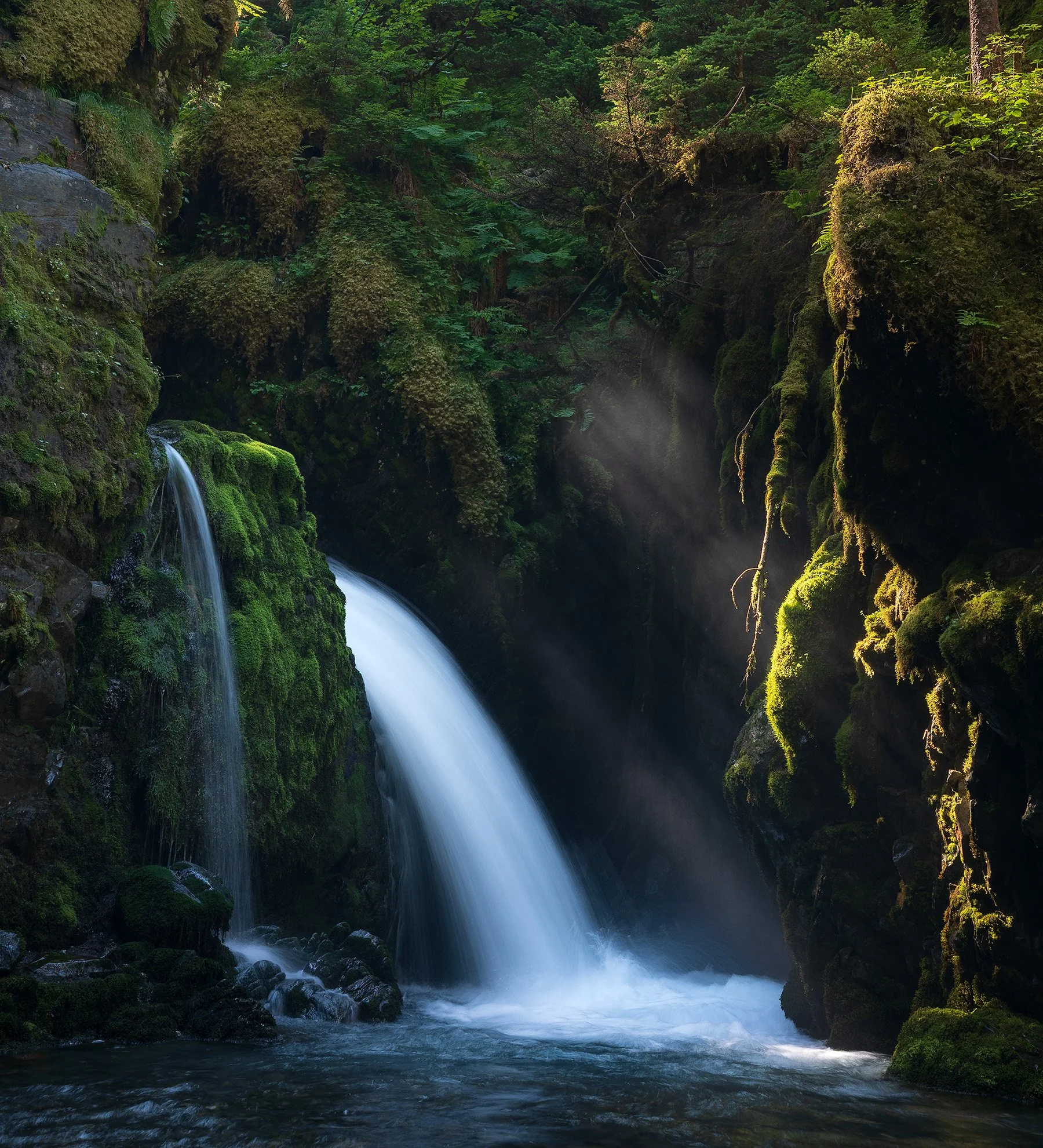
Nikon Zf + Thypoch 24-50 f2.8 (e-mount adapted)
When setting up the composition, I realized I’d likely end up cropping more than a third of the image off to create what I wanted. In that moment I had some fleeting thoughts about questioning if the 24mp I had from the Nikon Zf was enough. Of course it was enough, but I still had the thought it might not be. There’s something interesting about human nature, or maybe just how our consumerists brains are developed nowadays. It feels as if we always want more not long after finally reaching or achieving something new.
I try to subside these thoughts and feelings. Continually embracing how lucky I am to have what I do (which is more than I could ever dream of in regards to cameras). Yet in that moment standing there at that waterfall, my brain slipped into “what if I had one of my other cameras!” Regardless of the fact that I’ve proven to myself many times over that even smaller sensors are plenty, and to prove it once again. I decided to go back to that waterfall armed with multiple cameras: a crop sensor Fujifilm X-T4 (26mp) , the same Nikon Zf (24mp) , and a Hasselblad X2D II (102mp).
I spent more time composing my shot, used the same circular polarizer for each camera, and did my best to create identical conditions. Below are the images before editing:
Fujifilm X-T4
Nikon Zf
Hasselblad X2D II
You’ll notice the aspect ratio from the Hasselblad is different than the Fujifilm or Nikon. Also all of these have been edited with one extra stop of light because I underexposed the images in the field by at least one stop to protect the white parts of the waterfall. You’ll also likely notice quite a difference in how these images look based on the color profiles used for each of these cameras, plus how each camera renders color on it’s sensor.
The Fujifilm is using the Eterna profile, the Nikon using it’s Camera Neutral Profile, and Hasselblad using it’s only profile. Not to worry, these are corrected for within the edit but it does go to show how much difference is made right when you click the shutter depending on the image profile. I mean just look at the vibrance of the greens on the Nikon image.
All shots were taken using the same Freewell Variable ND as a Circular Polarizer

This guide will cover exactly how I personally setup my Nikon Zf including sections on:
Customizing dials and controls to quickly change the most important settings in the field.
i-Menu and My Menu setup to put the camera’s most crucial menu items one step away.
How to create, manage, and use Nikon Imagining Recipes + Film Grain
My guidance on exposure settings, focus modes, and best practices in the field.
Not only will this help you get up and running fast with a streamlined setup, I also explain what many of the settings actually do rather than simply tell you to copy me. That way you have the tools to customize much of this camera to your own preferences as well. I don’t cover every setting in this guide and this is certainly not a replacement for the official user manual (which is 893 pages). I do cover every possible settings I use on this camera, even the obscure ones.
THIS IS A DIGITAL DOWNLOAD and not a physical product. You’ll receive a PDF in both portrait and landscape orientation for viewing however you’d prefer. The file is less than 10MB and should be easy to download on nearly any internet connection.
I’ve spent over 15 years with different cameras in my hands and gotten very adept at knowing exactly what I want my camera setup to be. If for some reason you aren’t satisfied with the guide, shoot me an email. I’d love your feedback and to make it right with you. Buying this guide directly supports me and enables me to keep creating - thank you.
UPDATED for Nikon Zf’s Firmware Version 3.0
Nikon Zf Guide!
If you want to learn more about how to create recipes for the Nikon Zf or simply get a more streamlined setup for using your camera - check out my Nikon Zf guide.
I cover every button, dial, and menu I’ve adjusted to streamline my photography with the Nikon Zf. I also explain what many of the settings actually do rather than simply tell you to copy me. That way you have the tools to customize much of this camera to your own preferences as well.
My goal with this guide is to enable you to spend a lot less time fighting with your camera and a lot more time nailing shots.
Save yourself a lot of headache and time by grabbing it today! This is also the absolute best way to directly support me as a creator to keep making content like this!
Fujifilm X-T4
Nikon Zf
Hasselblad X2D II
These are the final edits. My workflow for these edits was to edit the Nikon image first and then copy it to the other images as best as possible. This includes more than just copy and pasting the edit. Like I said before, the color differences between these three cameras is quite a lot, thus matching them takes a bit of tweaking. I still didn’t get it quite 100% as the greens on the Fujifilm image feel just a tad overcooked, but thats okay. Thats what going back for another edit is for.
I’ve included 2500px images here as that’s about as large as I can host, plus theres multiple layers of compression. I won’t lie to you, of course the Hasselblad renders sharper and more detail. The lens alone cost more than both of the other cameras and lenses in this comparison combined. That being said the differences, especially in print, are so hard to see that you need to be 6 inches from the page to see them.
Cameras from the last 10 years are so good. Many times I find myself leaving home with some of my cheapest setups simply because I want to enjoy their experience knowing the image quality is completely adequate. What matters so much more is spending time on a composition, repeating visits for better light, or exploring an edit.
Don’t let your brain tell you that you always need more. Megapixels don’t matter, but you do. Something I still need to remind myself from time to time.
Thanks for reading.